


Repetitive booking data entry
Customer, shipment, routing and cargo details typed in for every booking.
Booking automation
CargoDocket reads booking emails and attachments, then prepares the booking in CargoWise for your team to confirm.
Book a DemoBooking ready in CargoWisePrepared for your team to confirm
B00031876Ningbo → Felixstowe · 1 × 40HC · 12 Nov
Flagged for reviewHeld before booking
Consignee unclearTwo consignees named in the email
Posted to
The problems
Booking information arrives through emails, forms and attachments. Your team gathers, checks and enters it before a booking can be created.
Customer, shipment, routing and cargo details typed in for every booking.

Booking information spans emails, attachments and booking forms.

Every customer and partner sends booking details in a different layout.

A missing date, reference or cargo detail means a follow-up before booking.

Captured information still needs checking against your workflow's requirements before booking.

More requests means more time spent gathering and entering data.
Capability overview
CargoDocket captures booking details, organizes information from supported documents and checks required fields.

Reads booking requests and documents to identify what's needed to create a booking.

Captures customer, reference, origin, destination, dates, cargo and weight details.

Brings together details spread across emails, attachments and booking documents.

Maps captured booking information to your configured workflow fields.

Checks captured information against configured requirements before processing.

Flags missing details or discrepancies for your team to review.
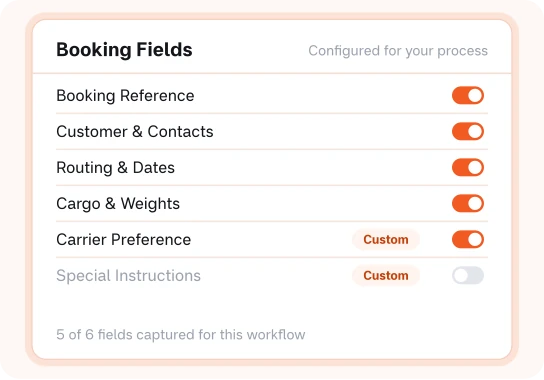
Captures and checks the fields that matter to your operation.

Prepares structured booking information, reducing repeated data entry.
Our workflow
CargoDocket brings booking requests, document processing, validation, review and CargoWise preparation together.

Booking requests and documents received by email enter the process for review.

Customer, shipment, routing, cargo and date details are checked before continuing.

Review the quoted rate and relevant shipment details against what's available.

Prepare and submit the booking, including carrier and schedule details.

Once validated, the booking is created with the relevant details.

Route the result for approval, then post it in CargoWise with every action logged.
Supported documents
CargoDocket supports the document inputs freight bookings actually arrive in, so your team works from one process.

Processes booking instructions received through emails and attached documents.
Handles standard and scanned PDF shipping instructions and booking confirmations.

Captures structured booking and container data from spreadsheets and CSV files.

Processes requests that arrive with different carrier and customer layouts.

Supported formats include JPEG, PNG and TIFF.

Handles booking documents across one or multiple pages.

Brings container, routing and cargo detail together across several files.
The benefits

Customer, routing, container and cargo details are captured automatically, not retyped from every email.

An incomplete container number, ETD or routing detail is flagged before the booking goes to the carrier.

Routing and cargo data is structured before it reaches CargoWise, so every booking looks the same.

A consistent capture-and-check process lets your desk handle peak-season volumes without extra hands.

Shipping instructions are organised as soon as they arrive, so requests reach the carrier ahead of cut-off.

Less time preparing records means more time on carrier space, customer updates and exceptions.
Why CargoDocket?
Every forwarder takes bookings a little differently. CargoDocket configures around your customers, carriers and booking rules.

Across logistics, technology and business process automation.

Shaped by a practical understanding of booking requests, carrier space and cut-offs.

Booking data that fits the CargoWise booking process your team already relies on.



Built around container types, routing and carrier cut-off detail, not generic forms.

Coordinated support to keep your booking automation project moving.

Reducing repetitive work while keeping carrier submission clear for your team.
CargoDocket reads incoming booking requests, extracts relevant shipment and booking information, validates the captured data, and prepares structured information for your CargoWise workflow.
Depending on your configured workflow, CargoDocket can capture information such as customer details, shipment references, routing information, cargo details, dates, and other required booking fields.
Yes. Booking information received through emails and supported attachments can be brought into the processing workflow for data extraction and preparation.
CargoDocket can process booking information from supported formats such as PDFs, spreadsheets, images, and email attachments, including single- and multi-page documents.
By extracting and organizing relevant booking information before it reaches the CargoWise workflow, CargoDocket reduces the amount of repetitive information your team needs to enter manually.
Send us the worst invoice or bill of lading you have. We’ll show you what CargoDocket reads from it.
Share a booking email and watch it become a complete CargoWise booking, with nothing typed by hand.
Book a call

