

Finance teams spend nearly 60% of their weekly hours on manual invoice checks, corrections, and data entry. When your business runs on CargoWise, that time should be spent on improving cash flow, not fixing vendor errors.
Accounts Payable (AP) is one of the most time-consuming processes in freight forwarding. Vendor invoices arrive in inconsistent formats, charge codes don’t match, references are missing, and every correction slows down job costing, accruals, and financial reporting.
Accounts Payable automation changes all of that. It cleans up invoice intake, validates data against CargoWise, and posts accurate invoices automatically, giving teams the speed, accuracy, and consistency modern logistics demands.
Why AP Automation Matters for CargoWise Users?
Even with a world-class ERP like CargoWise, many forwarders still rely on manual AP processes. And that’s where the workflow breaks.
Manual AP leads to:
- slow invoice posting
- Incorrect charge code mapping
- duplicate entries
- Inaccurate job costing
- delayed supplier payments
- recurring disputes
- long month-end cycles
CargoWise is built to support high-volume financial workflows, but only if the data entering the system is accurate. AP automation ensures the information feeding CargoWise is correct, complete, and consistently structured every time.
What does an Automated AP Workflow Look Like?
To understand AP automation, imagine removing the repetitive parts of invoice processing and letting a system handle them instantly.
Here’s the typical automated flow:
Invoices arrive → system extracts every field → validates against CargoWise rules and POs → flags exceptions → autogenerates the AP invoice → posts into CargoWise AP → updates job costs and GL in real time.
The workflow becomes smoother, faster, and significantly more accurate. Teams only review exceptions, not every invoice.
CargoWise AP Automation Setup Process
Setting up AP automation in CargoWise requires aligning data, rules, and workflows. Here’s the complete, refined setup process:
Step 1 — Clean & Standardise Master Data
Before automation begins, ensure:
- Vendor IDs and legal names are accurate.
- Tax IDs, currencies, and payment terms are consistent
- Charge codes & product charge codes align with GL accounts
- Cost centres and branches follow a unified structure
- Tax rules (GST, VAT, customs logic) are correct
Good master data = fewer exceptions + cleaner postings.
Step 2 — Control all Incoming Invoices
Automation can only process what it receives.
Centralise invoice entry through:
- a dedicated AP email inbox
- a vendor upload portal
- a shared network folder
- an automated email-capture tool
This prevents duplicates and ensures every invoice is captured on time.
Step 3 — Configure Extraction & Data Mapping
This is where automation learns how to read your invoices.
Extraction fields include:
- invoice date & number
- vendor name & tax ID
- job or PO reference
- charge codes
- currency & totals
- line-level freight, surcharges, storage, customs
- taxes & duties
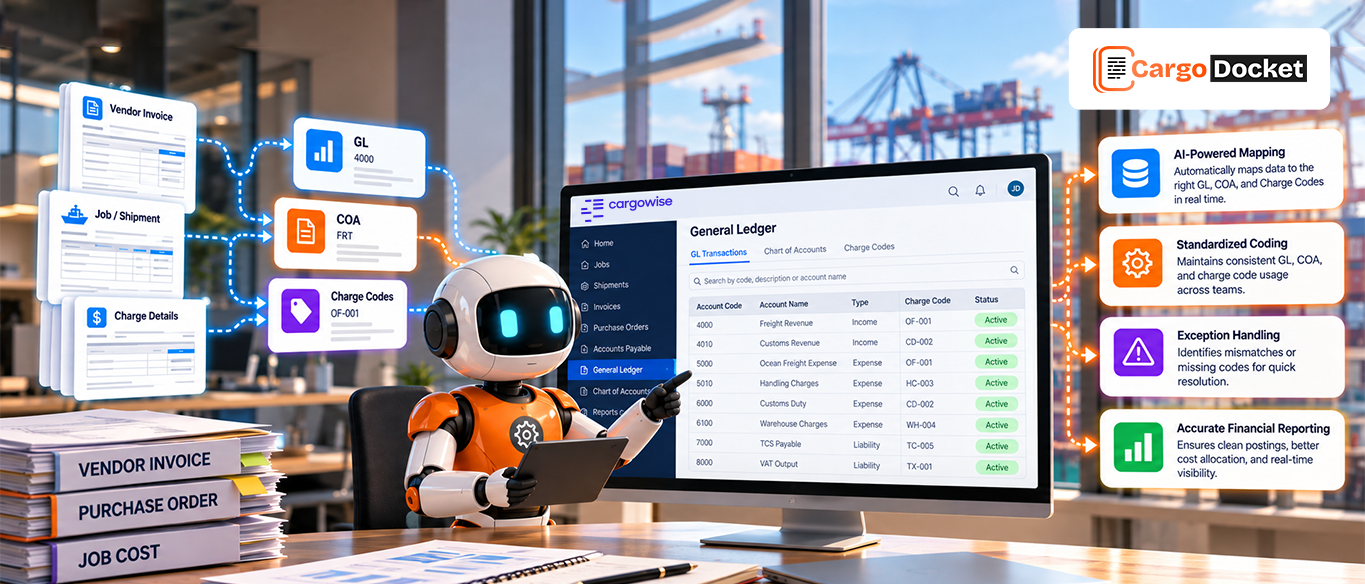
Mapping sends these values directly into CargoWise fields inside:
- AP Invoice Entry
- Charge Code Registry
- Supplier Master
- GL Accounts
Every field that was previously typed manually now posts automatically.
Step 4 — Build Validation Rules & Business Logic
Automation “thinks” utilising business rules that you define.
These include the following:
- price/quantity/tax variance tolerances
- PO matching requirements
- mandatory invoice fields
- duplicate detection
- Illegal charge code prevention
- Incorrect tax calculation flagging
- vendor currency checks
- accrual alignment rules
Invoices that meet rules auto-post.
Invoices that aren’t routed for review.
Step 5 — Set Up Approval Workflows in CargoWise
CargoWise Workflow Users can handle approvals based on:
- amount thresholds
- vendor category
- cost centre or branch
- invoice type (freight, storage, brokerage, handling)
- job or department rules
This removes email-based approvals entirely.
Step 6 — Enable Smart Exception Handling
Even with automation, human oversight remains important.
Exceptions are usually triggered for:
- Incorrect PO or job number
- mismatched rate or quantity
- missing vendor fields
- currency conflicts
- tax miscalculations
- unrecognised charge codes
- duplicate invoice numbers
These exceptions are routed to the correct approver.
Only invoices that genuinely require human judgment stop the workflow.
Step 7 — Run a Pilot Project with High-Volume Vendors
Choose 2–3 vendors that send the most invoices.
During the pilot test:
- extraction accuracy
- posting rules
- tolerance settings
- exception frequency
- GL and job cost alignment
Refine rules until exception rates drop significantly.
Step 8 — Scale, Expand & Optimise
Once stable, expand automation to:
- more vendors
- more document types (credit notes, customs invoices, carrier bills)
- more branches
- more trade lanes
Monitor KPIs weekly to identify gaps and continuously refine rules.
Key Benefits CargoWise Users can Expect
Automating AP workflows inside CargoWise delivers measurable operational and financial improvements across the business. Below are the expanded benefits with deeper explanations tailored for freight forwarders and logistics finance teams:
1. Faster, Predictable Invoice Processing
Automation reduces end-to-end processing time from hours to seconds. CargoWise users can finally eliminate obstacles during peak shipping periods, avoiding problems that slow job costing, vendor payments, and month-end closure.
Faster posting → updated job costs → faster billing → stronger cash flow.
2. Higher Data Accuracy Across Every Posting
Every invoice is validated against:
- PO quantities
- vendor charge rates
- shipment references
- job numbers
- currency rules
This eliminates inconsistent data entry and removes the guesswork AP teams deal with daily.
Accurate data and fewer disputes, fewer journal corrections, and cleaner GL balances.
3. Stronger Cost Control & Job Profitability Visibility
When invoices align perfectly with CargoWise job files, operations and finance see the true cost of each job instantly.
Automation ensures:
- correct cost allocation
- real-time margin visibility
- accurate profit per shipment
Decision-makers can identify profitable and unprofitable lanes without waiting for reconciliation.
4. Improved Accrual Accuracy for Month-End
Automation compares invoice data with CargoWise accruals and highlights mismatches immediately. This ensures costs are recognized in the correct period, one of the biggest challenges for freight forwarders.
Finance gets clean, accurate accruals without chasing operations.
How CargoDocket Pushes Clean Invoices into CargoWise?
CargoDocket acts as the automation engine that prepares and validates invoices before they hit CargoWise.
Here’s how the integration works:
- Invoices arrive from email or other sources
- CargoDocket extracts every field using OCR + AI
- All values are mapped to CargoWise fields
- The system checks against POs, bookings, and accruals
- Only validated, clean invoices are posted into CargoWise
The posting is instant, error-free, and fully audit-ready.
No manual typing.
No formatting issues.
No rework.
Common Pitfalls and How to Avoid Them?
- Dirty master data leads to inconsistent postings. → fix first
- Lack of tolerance levels → too many exceptions
- Over-automation too early → always start with a pilot
- No ownership of exceptions → assign clear roles
- Not training teams → confusion during rollout
Avoid these mistakes, and your automation rollout will be smooth and predictable.
Conclusion
AP automation inside CargoWise isn’t just a workflow improvement, it’s a financial upgrade. When invoices enter CargoWise clean, validated, and auto-ready, your operations move faster, costs drop, and your finance team finally gets the breathing room they need.
CargoDocket integrates tightly with CargoWise to automatically deliver accurate, validated AP data, eliminating manual data entry and giving your team clarity, speed, and confidence. Ready to clean up your AP workflow and eliminate manual invoice obstacles?
Book a free demo to see how AP automation in CargoWise can transform your finance processes.