
A vendor statement can look pretty straightforward until you have to reconcile it.
One statement may contain invoices, payments, credits, and adjustments that need to be compared with your AP records. Now multiply that by dozens or hundreds of vendors, and a simple reconciliation task can quickly turn into hours of spreadsheet work.
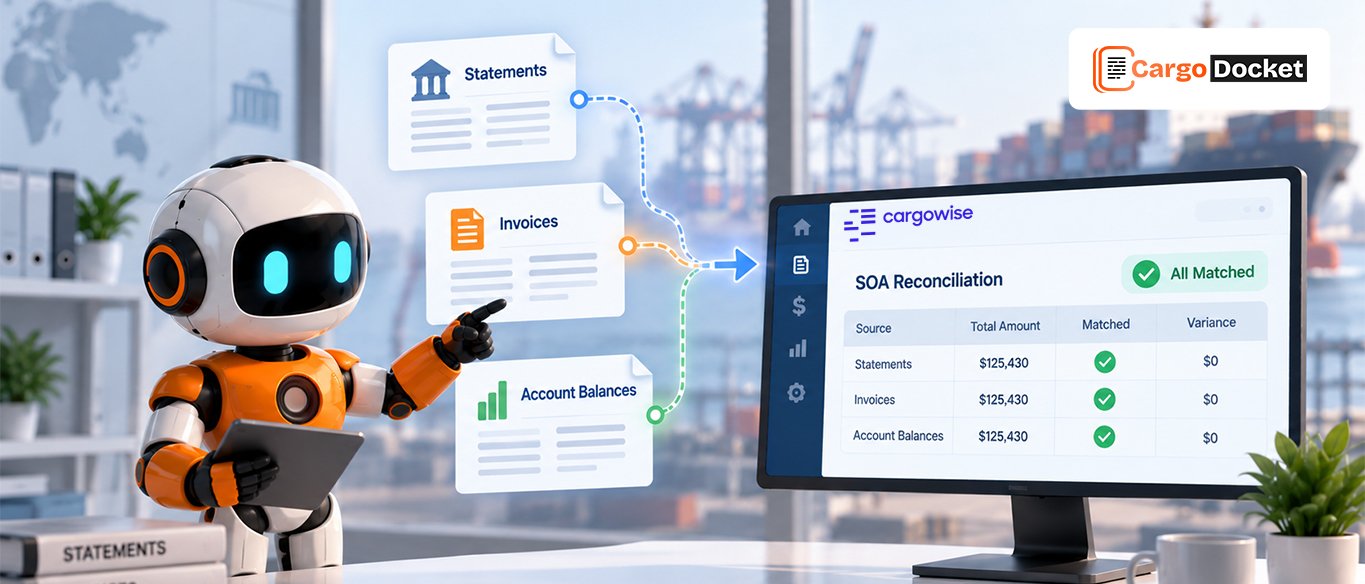
That’s where SOA reconciliation automation can help. AI can read vendor statements, extract transaction information, compare it with relevant CargoWise records, and highlight differences that need your team’s attention.
What is SOA Reconciliation and What are You Actually Comparing?
SOA, or Statement of Account, reconciliation is the process of comparing a vendor’s statement with your internal AP records to make sure the transactions and balances agree.
You’re typically comparing:
Vendor Statement → Invoices → Payments → Credits → AP Ledger → Outstanding Balance
For example, imagine your vendor sends this statement:
- Beginning balance: $12,500
- New invoices: $18,750
- Payments received: $15,000
- Ending balance: $16,250
Your AP ledger shows:
- Beginning balance: $12,500
- New invoices: $17,900
- Payments made: $15,000
- Ending balance: $15,400
There’s an $850 difference.
Now the real question is, where did that $850 come from?
It could be a missing invoice, a billing error, a timing difference, or an invoice that was received but hasn’t been processed yet. That’s what your finance team has to investigate.
Why can a Small SOA Difference Take so Much Time to Find?
The $850 difference itself isn’t difficult to calculate. Finding the transaction behind it is where things get tricky.
Your team may need to open the vendor statement, export AP transactions, search for invoice numbers, compare amounts, check payments, review credits, and document the result.
For a simple vendor with 5–10 monthly transactions, this type of reconciliation can take around 15–20 minutes. A vendor with 20–50 transactions can take 45–90 minutes.
Now multiply that across a large vendor portfolio.
That’s when spreadsheets start becoming obstacles.
What are the Common Differences You Need to Find?
Not every mismatch means the vendor made a mistake. The difference could come from several situations.
Missing invoice:
Vendor statement: $850 invoice
AP ledger: No $850 invoice
Payment mismatch:
Vendor statement: $5,000 payment
AP ledger: $4,500 payment
Amount difference:
Vendor statement: $8,000
AP ledger: $7,500
Duplicate invoice:
Invoice #4582—$2,400 appears twice.
Missing credit:
The vendor issued a $600 credit, but it isn’t reflected in the AP records.
Each situation needs a different response. The challenge is finding these differences quickly without manually checking every line.
How can AI Read and Extract Data from Vendor Statements?
Here’s where AI can take some of the heavy lifting off your team’s plate.
Vendor statements can arrive as PDFs, Excel files, scanned documents, or different layouts. AI can read the document and extract information such as:
- Vendor name
- Invoice number
- Invoice date
- Invoice amount
- Payment amount
- Credit or debit
- Outstanding balance
Instead of manually copying every transaction into a spreadsheet, the information can be converted into structured data ready for reconciliation.
The workflow becomes:
Statement Received → AI Reads Document → Data Extracted → Transactions Structured
That gives your finance team a cleaner starting point for the actual reconciliation.
How can AI Match Statements with Invoices and CargoWise Records?
Once the information is extracted, AI can help compare the statement transactions with relevant records in CargoWise.
For example:
Vendor Statement:
Invoice #4582 — $3,200
CargoWise/AP Record:
Invoice #4582 — $3,200
Result: ✅ Matched
Now consider:
Vendor Statement:
Invoice #4610 — $8,000
CargoWise/AP Record:
Invoice #4610 — $7,500
Result: ⚠️ $500 Difference
Instead of manually searching through spreadsheets and CargoWise records to find the problem, the difference can be brought forward for review.
AI can consider available information such as invoice number, amount, date, vendor details, and transaction references to identify likely matches.
How does AI Separate Matches From Exceptions?
Not every transaction should be automatically accepted.
A practical reconciliation workflow can separate transactions into different categories:
- Matched → Records agree.
- Unmatched → No corresponding record found
- Amount Difference → Records exist, but amounts differ
- Possible Timing Difference → Transaction may belong to another accounting period
- Unclear Match → Requires human review
For example, if a vendor statement shows an $8,000 invoice and the CargoWise record shows $7,500, the system can flag the $500 variance rather than forcing the transaction into a match.
That’s important because your finance team still needs to understand the reason behind the difference.
How does SOA Reconciliation Automation Change the Finance Workflow?
The difference becomes pretty clear when you compare the two approaches.
Manual Process
Statement → Spreadsheet → Search Records → Compare → Investigate → Document
Automated Process
Statement → AI Extraction → CargoWise Matching → Difference Detection → Exception Review
The goal isn’t to remove your finance team from the process.
It’s to stop asking them to spend their time finding every transaction manually.
AI can handle repetitive extraction and comparison, while your team focuses on exceptions, approvals, and financial decisions.
How can CargoDocket Support SOA Reconciliation Automation in CargoWise?
This is where CargoDocket can help bring the workflow together.
CargoWise AI Document Automation can process incoming vendor statements, extract invoice and payment information, and assist with reconciliation against relevant CargoWise records.
Imagine receiving a vendor statement with 50 transactions.
Instead of manually checking all 50 lines, the workflow can help organize them into:
Matched Transactions → Differences → Missing Records → Exceptions for Review
For example, if 45 transactions match and 5 require attention, your team can focus on those five instead of manually investigating all 50.
The workflow can look like this:
Vendor Statement Received → AI Extracts Data → Matches With CargoWise → Identifies Differences → Flags Exceptions → Finance Team Reviews
That’s the practical value of automation: less time searching, more time resolving.
What should You Consider Before Automating SOA Reconciliation?
Before automating the process, define how your team wants reconciliation to work.
Consider:
- Which transactions can be matched automatically?
- What amount differences require review?
- How should timing differences be handled?
- Which exceptions need approval?
- How should reconciliation activity be documented?
- What information should be available for audit and follow-up?
Clear rules help ensure automation supports your finance process rather than creating another system your team has to manage.
Conclusion
SOA reconciliation can become time-consuming when teams manually compare vendor statements with AP and CargoWise records. AI can help extract transaction data, match records, and highlight differences for review.
With AI Document Automation, you can reduce spreadsheet work and make reconciliation more focused and manageable.
Ready to simplify SOA reconciliation in CargoWise? Contact us to see how AI Document Automation can help your team process vendor statements, match transactions, and identify differences faster.