
A charge code may look like a small detail, but when the wrong or duplicate code is used, finance teams can end up spending extra time on corrections, reconciliation, and reporting checks.
As invoice volumes grow, manually checking every transaction becomes harder to keep up with. AI automation can help by validating financial information, checking charge-code mappings, and flagging questionable transactions before they move further into the CargoWise workflow.
Why do Duplicate Charge Codes Happen in CargoWise?
Duplicate charge codes can appear as a business grows and adds new services, suppliers, branches, or financial requirements. Over time, similar charges may be created with different names, mappings, or accounting rules.
Manual invoice processing can make the problem harder. A finance user may need to read an invoice, understand the charge, find the related job, and choose the right CargoWise charge code. When similar codes are available, selecting the wrong one becomes easier.
The issue is not simply having more charge codes. It is making sure each code has a clear purpose and is consistently mapped to the right financial activity.
What Problems can Duplicate Charge Codes Create?
A duplicate charge code may not seem like a major issue on one invoice. The bigger concern is what happens when the same problem appears across many jobs.
Incorrect charge-code mapping can affect:
- Revenue recognition
- WIP calculations
- Accrual postings
- Job profitability
- General Ledger postings
- Financial reporting
This means charge-code accuracy is closely connected to the reliability of financial data in CargoWise.
Where can AI Help with Charge-Code Validation?
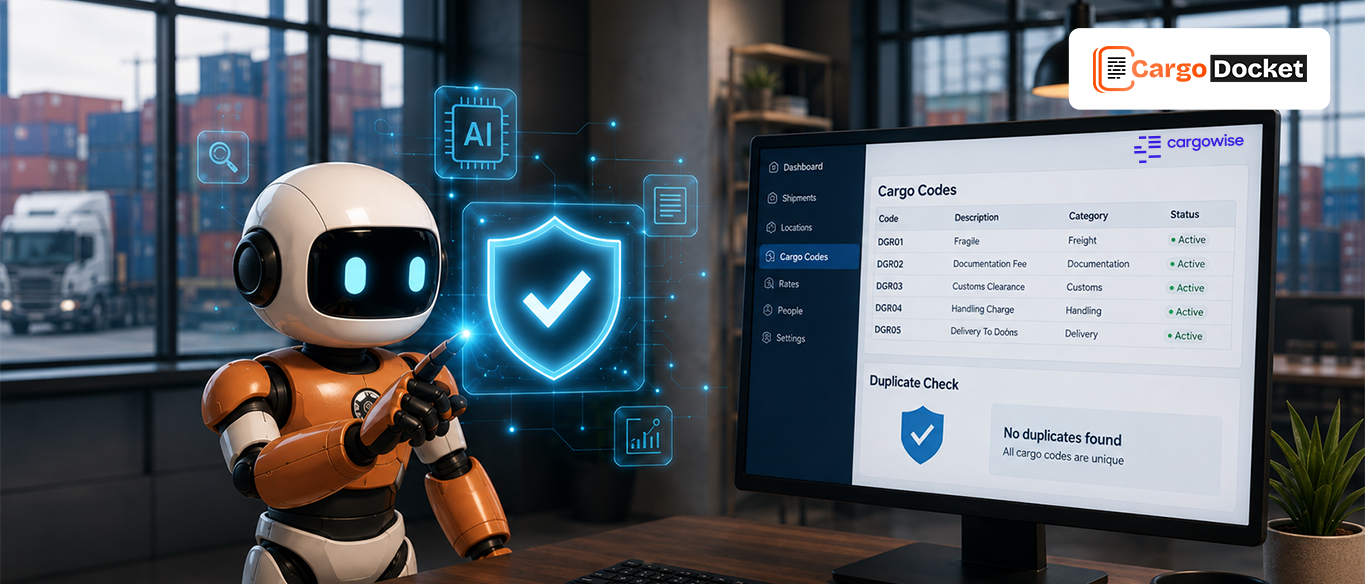
AI can add a validation step between the incoming document and the CargoWise workflow.
For example, when a supplier invoice arrives, AI can read the document, identify the charge, capture the relevant financial information, and compare it with the available CargoWise data.
The workflow can look like:
Invoice received → Data extracted → Charge identified → CargoWise data checked → Charge code validated → Process or flag
Instead of relying entirely on someone to manually interpret every invoice, AI can perform the initial checks and bring questionable transactions to the team’s attention.
How can AI Help Identify the Right Charge Code?
AI can look at the information around a charge rather than relying only on the wording of the charge itself.
It can consider details such as:
- Charge description
- Supplier
- Job or shipment reference
- Existing CargoWise records
- Financial mapping rules
- Related transaction information
If the information clearly matches an approved charge code, the transaction can continue. If two codes look similar or the information is unclear, AI can flag the transaction rather than making an uncertain decision. Good automation should know when to stop and ask for a human review.
What Happens When AI Finds a Possible Duplicate?
A possible duplicate does not always mean the transaction is wrong. Two similar charges may have different business purposes or accounting treatments.
When AI identifies a possible duplicate or unclear mapping, it can send the transaction to an exception workflow.
The finance team can then review:
- The charge shown on the invoice
- The selected or suggested CargoWise code
- Similar existing charge codes
- The related job information
- Why the transaction was flagged
Once the correct treatment is confirmed, the transaction can move forward.
This keeps financial decisions with the finance team while AI handles the repetitive checking.
How can AI Help Prevent the Same Issue from Repeating?
Finding one duplicate charge code is useful. Preventing similar issues from appearing again is even more valuable. AI automation can apply the same validation rules every time a document is processed. Instead of relying on individual users to remember which code should be selected, the workflow can check the transaction against defined rules and CargoWise records.
The process becomes:
Capture → Validate → Check → Flag → Review → Process
If the same type of exception keeps appearing, it can also point to a deeper issue with charge-code mapping or master data that needs attention.
This is important because automation works best when the underlying financial process and data are already well defined.
How does AI Reduce Manual Work for Finance Teams?
Without automation, a finance user may need to open an invoice, identify the charge, find the related job, select the charge code, check the mapping, and verify the transaction.
Doing that once is manageable, doing it hundreds of times is where the workload adds up.
AI can handle the initial document reading and validation, allowing finance professionals to focus on transactions that actually need their attention.
Instead of checking every invoice in the same way, teams can work from a focused exception queue, that means less time spent on routine checking and more time for reconciliation, supplier issues, month-end activities, and financial review.
Why does Human Review Still Matter?
AI automation should not mean that every financial transaction is processed without oversight.
Some situations still need a closer look, especially when:
- Two charge codes appear equally suitable
- A transaction contains an unusual charge
- The financial mapping is unclear
- A value falls outside an expected range
- A supplier uses an unexpected charge description
In these cases, AI can highlight the issue and provide the information needed for the finance team to make the final decision.
The balance is simple: AI handles repetitive validation, while finance teams handle exceptions and decisions.
How does CargoDocket AI Help CargoWise Users?
CargoDocket AI helps CargoWise users automate document-heavy financial workflows by extracting invoice information, mapping it to CargoWise data, validating financial details, and identifying transactions that need attention.
During Accounts Payable processing, AI can check supplier information, job references, charges, and other invoice details before the transaction moves forward. When information does not match the expected rules or requires additional review, the transaction can be routed to an exception workflow.
The process is straightforward:
Read → Extract → Validate → Check → Flag → Review → Process in CargoWise
This gives finance teams a practical way to reduce repetitive checking while keeping control over important financial decisions.
What should Businesses Check Before Automating Charge Codes?
AI works best when the underlying CargoWise data and financial rules are clear and well maintained.
Before automating charge-code validation, businesses should review:
- Charge-code structure
- Existing mappings
- CargoWise master data
- Accounting rules
- Approval requirements
- Exception tolerances
- User responsibilities
Clean data and clear rules give AI a stronger foundation for making reliable validation decisions. The goal isn’t to automate a messy process and hope for the best. It is to create a consistent process that AI can validate and finance teams can control.
Conclusion
Duplicate charge codes can affect more than data cleanup, they can create problems with financial postings, reconciliation, job profitability, and reporting.
AI automation can help identify questionable charge-code matches earlier, reduce repetitive checking, and route exceptions to the right people. Ready to reduce charge-code issues in CargoWise? Schedule a demo to see how CargoDocket AI can help.