
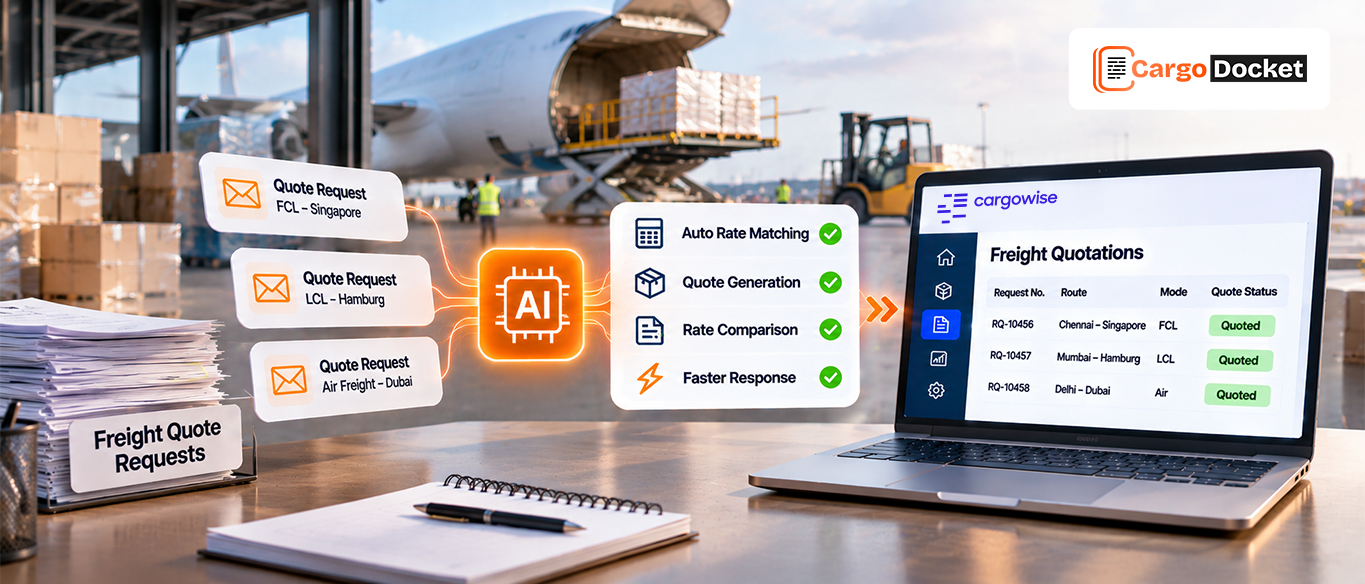
A customer sends a freight quote request through email. Another follows up on WhatsApp, while a third shares shipment details through your sales portal. Before your team can send even one quotation, they need to collect the shipment information, check freight rates, calculate additional charges, and prepare the pricing.
Now imagine handling several requests like this throughout the day. Your team can easily spend hours moving between messages, spreadsheets, rate records, and CargoWise instead of responding to customers and following up on new opportunities.
That’s where AI-powered CargoWise quotation automation can make a difference. It helps you manage incoming requests, retrieve relevant rates, prepare quotations, and keep every quote organized, so your team can respond more efficiently without getting held up by repetitive tasks.
What is Freight Quotation Automation and How does it Work?
A freight quotation is a price estimate you provide to a customer for transporting goods from one location to another. For example, when a customer requests a shipment from Shanghai to Los Angeles, your team needs to consider several costs before sharing the quote. These may include freight charges, origin charges, destination charges, additional surcharges, and the quotation’s validity period.
Preparing these details for every customer request can take time, especially when your team handles multiple quotations across different shipping routes and transport modes.
Freight quotation automation simplifies this work by helping your team capture shipment details, retrieve relevant rates, apply pricing rules, and prepare quotations with less manual effort.
When connected with CargoWise, it helps keep quotation activities aligned with your existing workflow, reducing repetitive data entry and making it easier to manage incoming requests.
What Makes it Difficult for Your Team to Manage Multiple Freight Quote Requests Manually?
Handling a few quotation requests may seem manageable. But when several customers send RFQs at the same time through different channels, the workload can quickly increase.
Your team may need to switch between emails, WhatsApp, Teams, spreadsheets, rate sheets, and CargoWise to prepare each quotation. This can create delays and make it difficult to keep every request moving.
Here are some common challenges you may face:
- Searching for freight rates: Your team spends time checking different rate sheets, carrier contracts, and pricing records to find suitable rates for each shipment.
- Collecting shipment details: Important information such as origin, destination, cargo type, weight, and dimensions may be spread across multiple messages and attachments.
- Checking additional charges: Reviewing origin charges, destination charges, surcharges, and other applicable costs manually can delay quotation preparation.
- Managing multiple customer requests: When several customers are waiting for quotations, tracking pending requests and responding on time becomes difficult.
- Repeating data entry: Entering the same customer and shipment information into different records increases workload and creates opportunities for errors.
The bigger challenge is that your team can spend more time preparing quotations than communicating with customers and following up on new business opportunities.
How can AI Help You Read Quote Requests, Match Freight Rates, and Prepare Quotations in CargoWise?
Instead of manually reviewing every message and collecting information from different sources, AI-powered quotation automation can help your team manage the quotation workflow through six key stages.
01. Request Parsing
Your customers may send quotation requests through email, WhatsApp, or your sales portal. These requests can contain shipment information in messages, attachments, or different document formats.
AI reads the incoming requests and extracts important details such as origin, destination, cargo type, weight, dimensions, package count, and transport mode.
This gives your team organized shipment information without having to manually review and enter every detail.
02. Rate Retrieval
Once the shipment details are captured, the system retrieves relevant air and ocean freight rates from configured pricing sources.
It can identify suitable rates based on the shipment route, transport mode, carrier, customer requirements, and applicable charges. When an ad-hoc rate is needed, the workflow can request additional pricing information.
If a rate is missing, expired, or unsuitable, it can be flagged for your team’s attention.
03. Quote Assembly
Finding the right rate is only one part of preparing a quotation. Your team also needs to consider customer requirements, pricing rules, applicable charges, and profit margins.
AI helps organize these details and prepare the quotation based on your configured pricing rules, customer profiles, and preferences.
This reduces the need to build every quotation from scratch and helps maintain consistency across customer quotes.
04. Validation
Before a quotation is shared, the pricing and shipment details need to be checked.
The system can validate configured margins, identify unusual pricing or missing information, and flag anomalies for review. It can also log validation decisions so your team can refer to them during an audit.
Your team can review exceptions and make the necessary corrections before the quotation is approved.
05. Delivery
Once the quotation is prepared, it can be sent to your team for review or directly to the customer, depending on your configured workflow.
The quote can follow your company’s preferred format and branding. If the request came through email, WhatsApp, or another supported messaging channel, the prepared quotation can also be shared through the same chat when configured.
This helps your team maintain a consistent customer communication process.
06. Central Logging
Managing a quotation doesn’t end when it is sent. Your team also needs to know what was quoted, which customer received it, and what happened next.
The system records every quotation centrally, keeping quote information organized and accessible to your team.
This makes it easier to track quotation activity, maintain complete records, and keep everyone aligned.
What should You Check to Make Sure Your Freight Quote is Accurate Before Sending it to the Customer?
Preparing quotations faster is important, but sending the wrong price can affect your margins and customer relationships. Before sharing a quotation, make sure your team reviews these details:
- Shipment information: Are the origin, destination, cargo details, weight, dimensions, and package count correct?
- Freight rates: Do the selected rates match the shipment requirements, and are they still valid?
- Additional charges: Have you included the applicable origin charges, destination charges, and surcharges?
- Customer pricing: Does the quotation follow the agreed customer or contract rates?
- Profit margins: Does the final price meet your configured margin requirements?
- Quotation validity: Have you clearly mentioned how long the offered rates will remain valid?
- Exceptions: Have missing details, unusual charges, and other flagged items been reviewed?
A consistent review helps your team reduce pricing mistakes and send quotations with greater confidence.
How does CargoDocket Help You Automate Freight Quotation Processing in CargoWise?
When quotation requests keep coming in, your team needs a way to manage them without spending hours on repetitive work. That’s where CargoDocket helps.
CargoDocket connects our AI-powered quotation automation with your CargoWise workflow to simplify how you receive, process, and prepare freight quotations.
With CargoDocket, you can:
- Process incoming RFQs: Capture quotation requests from email, WhatsApp, Teams, and other supported messaging apps.
- Extract shipment information: Identify important details such as origin, destination, cargo type, weight, and dimensions.
- Retrieve relevant pricing: Find suitable air and ocean rates from configured pricing sources and request ad-hoc rates when needed.
- Prepare quotations: Organize shipment details, customer preferences, charges, and configured pricing rules.
- Validate quote details: Check configured margins, identify unusual pricing, and flag missing information for review.
- Deliver quotations: Send prepared quotes to your team for approval or directly to customers according to your configured workflow.
- Keep CRM information in sync: Connect with your existing CRM software so customer details, inquiries, and sent quotations stay aligned.
- Support booking creation: Once a quotation is accepted, the relevant information can support the CargoWise Booking Creation workflow, reducing repeated data entry.
Your team stays involved in reviewing quotations and handling exceptions, while CargoDocket helps reduce the repetitive work behind each request.
Give Your Team More Time to Win the Next Freight Quote
A delayed quotation can mean a missed opportunity. When your team spends too much time searching for rates, checking shipment details, and preparing quotes manually, it has less time to respond to customers and follow up on new inquiries.
CargoDocket helps simplify freight quotation processing, reduce repetitive work, and connect your quotation activities with CargoWise.
Ready to spend less time preparing quotations and more time winning business? Contact us to see how AI-powered quotation automation can support your freight forwarding operations.