
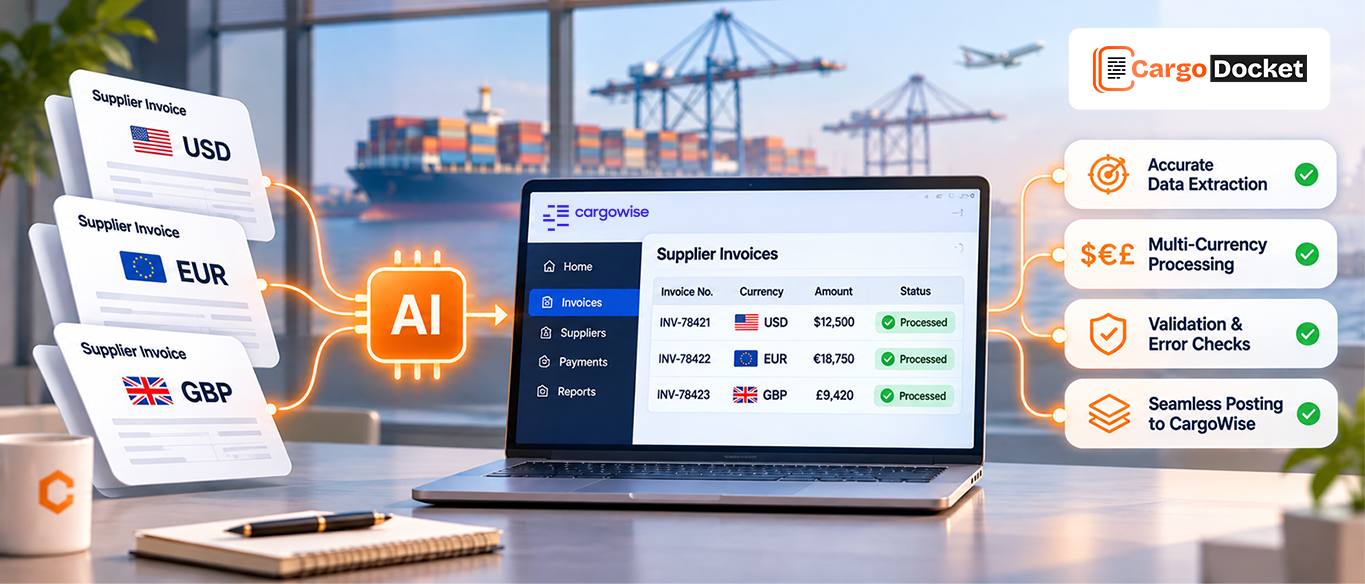
A supplier sends an invoice in USD. Another bills you in EUR, while a third sends charges in GBP. Your accounts payable team needs to process all three, but each invoice may have a different layout, currency format, charge description, and set of shipment references.
Now add the usual workload: checking supplier details, verifying invoice totals, matching charges to the right CargoWise job, and making sure the correct currency is recorded. It’s easy for a small data-entry mistake to turn into a bigger finance issue.
AI automation can help take the repetitive work off your team’s plate. It reads supplier invoice details, identifies the invoice currency, checks key information against configured rules and CargoWise records, and helps prepare accurate data for processing. Your team can then spend less time keying in information and more time reviewing the items that actually need attention.
What Makes Multi-Currency Supplier Invoice Processing Challenging in CargoWise?
When you work with overseas carriers, agents, and other suppliers, receiving invoices in different currencies is part of the job. The challenge is making sure every invoice is recorded correctly without mixing up the original amount, currency, exchange rate, or job costs.
For example, you might receive:
- A USD invoice from an overseas shipping partner.
- A EUR invoice for destination handling charges.
- A GBP invoice for transportation or other local services.
Each invoice needs to be checked and linked to the right supplier and CargoWise job. Even when the invoice layout looks familiar, the currency symbols, decimal separators, date formats, and charge descriptions may vary.
If your team handles these details manually, the workload adds up quickly. A wrong currency selection or an incorrectly entered amount can affect cost records, job profitability, and financial reporting.
Why can Different Invoice Currencies Lead to Costly Data Entry Mistakes?
The tricky part isn’t just recognizing whether an invoice is in USD, EUR, or GBP. It’s making sure the currency and amount stay together throughout the processing workflow.
A few common issues can create problems for your finance team:
- Incorrect currency selection: An invoice issued in EUR may accidentally be recorded in USD.
- Decimal and number format differences: Suppliers may use different separators for thousands and decimals, making amounts harder to interpret.
- Incorrect exchange rate application: Using the wrong rate or rate date can affect the local-currency value recorded for a job.
- Charge mismatches: A supplier’s description may not match the charge code or cost recorded in CargoWise.
- Manual data entry errors: Re-entering invoice numbers, amounts, dates, and supplier details increases the chance of mistakes.
These errors can affect more than the invoice itself. They may also influence job costing, outstanding payables, and the financial reports your team relies on.
How does AI Identify Currency and Extract Supplier Invoice Details?
AI document automation starts by reading the supplier invoice and identifying the information your team needs to process it.
Whether the supplier sends a digital PDF, Excel file, or scanned invoice, document extraction can help capture key details such as:
- Supplier name and account details.
- Invoice number and invoice date.
- Currency code (USD, EUR, or GBP).
- Invoice total and individual charge amounts.
- Tax amounts and applicable details.
- Job, shipment, or reference numbers.
- Charge descriptions and quantities.
For example, imagine a carrier sends you a GBP invoice containing transportation charges for several shipments. Your team would normally open the document, locate the relevant details, and enter them into the appropriate fields.
AI can extract those details into structured data, helping reduce repetitive typing and making the information easier to validate before it reaches CargoWise.
How does Automation Check Currency, Amounts, and Invoice Details Before Processing?
Extracting invoice information is only one part of the process. You also need to make sure the extracted values are correct.
This is where validation rules make a difference. Instead of simply reading an invoice and moving its data forward, the automation workflow can check important fields against configured business rules and available CargoWise records.
For example, it can help verify:
Currency and amount checks: Confirm that the detected currency matches the invoice and that the original amount is captured correctly.
Supplier validation: Check whether the supplier name or account reference matches the relevant CargoWise organization record.
Invoice total checks: Compare line-item amounts with the stated invoice total and flag calculation differences.
Job reference checks: Verify whether the shipment or job reference exists in CargoWise.
Charge code checks: Compare extracted charge descriptions with configured charge mappings and identify items that need attention.
These checks help catch incorrect or incomplete information before it moves further into your accounts payable workflow.
How do You Handle Exchange Rates without Mixing Up Original and Local Currency Values?
This is an important part of multi-currency invoice processing.
Let’s say your supplier sends an invoice for EUR 2,500. Your company may need to retain the original EUR amount while also recording its equivalent in your branch’s local accounting currency.
The two values serve different purposes. The original amount tells you what the supplier billed, while the local-currency value helps your finance team understand the cost in the company’s accounting currency.
Our AI automation supports this process by capturing the invoice currency and original amount accurately, then passing the relevant information into the configured CargoWise workflow.
For reliable processing, your team should ensure that:
- The original invoice currency is preserved.
- The correct exchange-rate rule is applied in CargoWise.
- The applicable rate date follows your accounting policy.
- Any conversion or rounding differences are identified.
- Unusual currency or amount differences are sent for review.
Remember: AI extracting a currency value is not the same as independently deciding which exchange rate should apply. That decision should follow your configured CargoWise rules and finance procedures.
What if the Invoice Details of Currency or Amount are Incorrect?
Not every supplier invoice will arrive with complete or consistent information.
A supplier might select the wrong currency, include an unexpected charge, provide an incorrect job reference, or send an invoice total that doesn’t match its line items.
Rather than allowing questionable information to move forward, an automation workflow can flag these exceptions for your team.
For instance, if a supplier invoice is identified as USD but the related CargoWise cost record uses EUR, the difference can be highlighted for review. Your finance team can check the original document, confirm the correct details, and decide what needs to be updated.
This approach helps your team focus on:
- Incorrect or missing currency information.
- Invoice totals that don’t add up.
- Unrecognized supplier details.
- Missing or incorrect shipment references.
- Unexpected charges and cost differences.
The goal isn’t to automate every decision. It’s to reduce routine checking while keeping your team in control of exceptions.
How can CargoDocket Help You Automate Multi-Currency Supplier Invoice Processing in CargoWise?
When your team handles supplier invoices across multiple currencies, manually capturing and checking every detail can take up valuable time.
CargoDocket’s AI Document Automation helps simplify invoice processing by extracting supplier details, invoice numbers, currencies, amounts, charge descriptions, and other relevant information from incoming documents.
Within a configured CargoWise workflow, the extracted information can be mapped and checked against available supplier, job, accrual, and charge-code records. Validation rules help identify missing details or mismatches, while exceptions can be routed for your team’s review.
This gives your accounts payable team a more structured way to handle USD, EUR, and GBP supplier invoices without repeatedly entering the same information.
Make Multi-Currency Invoice Processing Easier for Your Finance Team
Processing supplier invoices in USD, EUR, and GBP doesn’t have to mean more manual work for your accounts payable team. With the right automation workflow, you can capture invoice details, validate currencies and amounts, and prepare accurate information for CargoWise processing.
CargoWise manages the configured financial and exchange-rate rules, while AI Document Automation helps reduce the repetitive document-handling work that comes before processing.
Ready to reduce manual invoice entry and improve accuracy across your multi-currency supplier invoices? Contact us today to explore how our AI Document Automation solutions can support your CargoWise accounts payable workflow.