
A small difference in quantity, pricing, currency, or an unexpected charge can turn a routine invoice into a reconciliation headache. When purchase orders and vendor invoices are checked manually, finance teams have to open documents, compare line items, and figure out whether every charge is actually valid.
As invoice volumes grow, that manual document checking becomes harder to keep up with. AI-powered PO-to-invoice matching helps CargoWise teams compare purchase orders with vendor invoices, identify discrepancies earlier, and focus their attention on the transactions that actually need review.
What Makes PO-to-Invoice Matching Such a Time-Consuming Task?
A purchase order establishes what was expected from the vendor, while the vendor invoice shows what the vendor is actually charging. In a perfect process, the two should line up.
Invoices don’t always work that way.
Finance teams may need to compare the PO number, vendor, product or service description, quantity, unit of measure, unit price, total amount, currency, additional charges, and job or shipment references.
The problem is that these details may appear differently across documents. A PO might use one description while the vendor uses another. The quantity may have changed after the order was issued. An additional freight or handling charge may appear on the invoice but not on the original PO.
So the work isn’t simply about finding the right invoice. It’s about determining whether the invoice accurately represents what was ordered and agreed upon.
Why can a Small Difference Become a Bigger Billing Problem?
A mismatch doesn’t automatically mean the vendor made a mistake. Perhaps an additional charge was approved. Maybe the quantity changed during the shipment. Or an agreed price adjustment wasn’t reflected in the original PO.
The challenge is figuring out which situation you’re dealing with.
If the invoice is approved without checking, the company could pay more than expected. If every difference is investigated manually, AP specialists can spend a significant amount of time reviewing invoices that ultimately turn out to be valid.
That creates a familiar balancing act for finance teams:
Process invoices quickly without losing control over what you’re paying for.
AI-powered matching can help by identifying potential differences early, so teams can focus their attention where it is actually needed.
How does AI Compare Purchase Orders With Vendor Invoices?
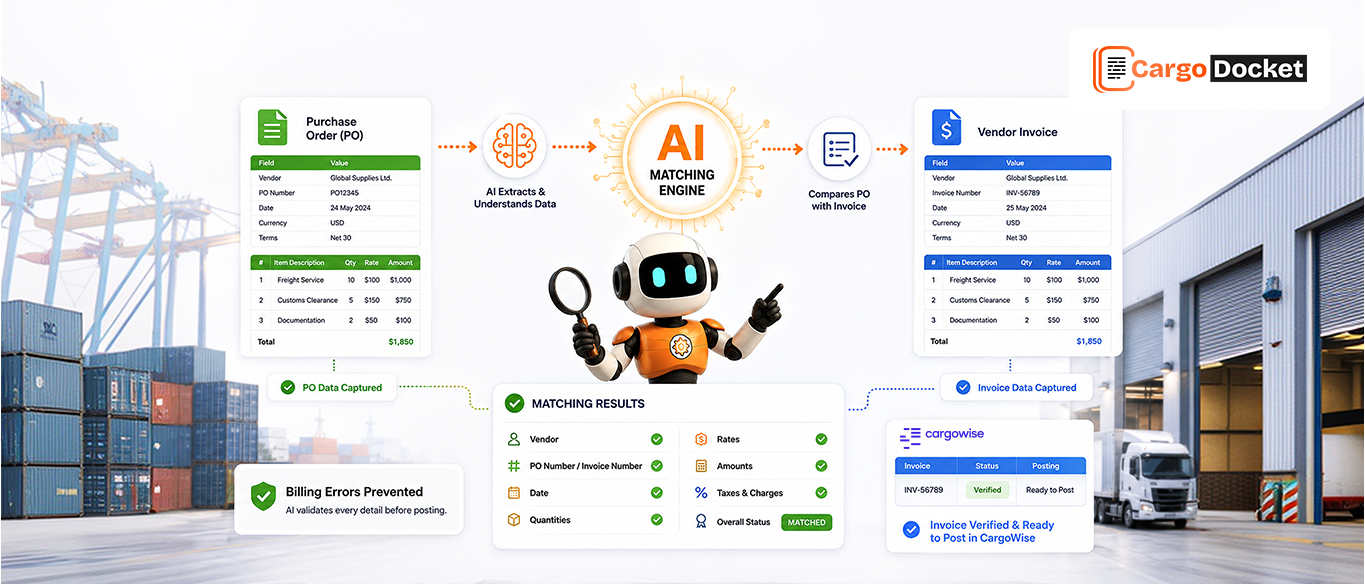
AI can treat the purchase order and vendor invoice as related information rather than two documents that someone has to manually compare.
It can extract relevant details from both documents and look for relationships between them.
For example, AI can compare:
- PO number and invoice reference
- Vendor details
- Ordered and invoiced quantities
- Unit prices
- Total amounts
- Currency
- Product or service details
- Additional charges
- Relevant shipment or job references
If the information lines up, the transaction can continue through the appropriate workflow.
If something doesn’t line up, the difference can be identified for review.
This shifts the process away from checking every invoice line by line and toward an exception-based approach where unusual transactions receive more attention.
How does AI Know Which Information Should Match?
This is where AI-powered document processing goes beyond simply reading text.
A purchase order and an invoice may use different layouts, wording, or formats. The system needs to identify which pieces of information are relevant and determine what should be compared.
For example, a PO could show:
Quantity: 500 units
Unit price: $20
Total: $10,000
The vendor invoice could show:
Quantity: 500 units
Unit price: $22
Total: $11,000
The quantity matches, but the price and total do not.
AI can help structure those details and surface the $1,000 difference instead of requiring someone to discover it manually.
The same approach can be used to compare quantities, references, pricing, currencies, and other relevant fields based on the organization’s matching rules.
Which Vendor Billing Errors can AI Help Identify?
Once PO and invoice information can be compared consistently, several common billing problems become easier to spot.
Quantity Differences
The vendor invoices for more units or services than were included in the purchase order.
Price Differences
The unit price on the invoice is higher or lower than the agreed PO price.
Incorrect PO References
The invoice contains an incorrect PO number or doesn’t include a reference that helps connect it to the right transaction.
Unexpected Charges
Additional freight, handling, fuel, or other charges appear on the invoice and need to be verified.
Duplicate Invoices
An invoice with similar vendor, invoice number, amount, or reference information may already have been submitted.
Currency Differences
The invoice and PO use different currencies, creating another point that may need validation. These differences shouldn’t automatically be treated as errors. They are signals that something needs to be checked.
What Happens When the PO and Invoice Don’t Match?
This is where human judgment remains important.
Imagine a purchase order for $10,000 and a vendor invoice for $11,000. AI can identify the variance, but it cannot automatically know whether that extra $1,000 represents an approved charge or an actual billing mistake without the necessary business context.
The finance team may discover that:
- An additional service was approved.
- The order quantity changed.
- A new charge was agreed upon.
- The vendor used the wrong rate.
- The invoice contains an actual billing error.
Instead of the AP team discovering the difference during a manual check, the exception can be surfaced for investigation.
The team can then decide whether to approve the invoice, correct the information, contact the vendor, or hold the transaction. AI finds the difference. Your team decides what the difference means.
How does AI-Powered PO and Invoice Matching Work in CargoWise?
Once the relevant PO and invoice information has been extracted, AI-powered matching can help compare that information with the appropriate records within the CargoWise workflow.
The matching process can consider information such as vendor details, PO references, quantities, pricing, amounts, and other fields configured for the organization’s process.
When the information aligns, the invoice can continue through the appropriate workflow. When a difference is identified, it can be treated as an exception for further review.
This is particularly useful because the purchase order and invoice are part of a wider operational and financial process. Keeping their relationship visible can give finance teams better context when reviewing vendor charges.
The exact matching rules and level of automation will depend on the organization’s CargoWise configuration and business requirements.
How can AI Reduce the Manual Work Behind Invoice Review?
Manual matching may be manageable when invoice volumes are low. The challenge appears when the number of vendors, purchase orders, and invoices continues to grow.
An AP specialist may need to repeatedly find the PO, open the invoice, locate the relevant fields, compare values, check additional charges, and determine whether a difference is legitimate.
Doing that once isn’t particularly difficult.
Doing it hundreds of times is where the workload becomes a problem.
AI can handle much of the repetitive comparison work and bring potential exceptions forward. That can reduce the time spent on:
- Searching for PO information
- Comparing documents manually
- Rechecking invoice values
- Identifying basic discrepancies
- Looking for potential duplicates
- Following routine matching steps
The goal isn’t to make your finance team better at manual matching.
It’s to reduce how much manual matching they have to do.
How can AI-Powered Matching Improve Financial Control?
Speed is important, but finance teams also need control.
An invoice shouldn’t be delayed unnecessarily because someone has to manually verify information that already matches. At the same time, an invoice with a significant difference shouldn’t move forward without review.
AI-powered matching can help create that balance by separating transactions that appear consistent from those that need attention.
Instead of spending equal time on every invoice, teams can focus on:
- Genuine pricing differences
- Quantity discrepancies
- Unexpected vendor charges
- Potential duplicate invoices
- Missing information
- Exceptions requiring vendor clarification
This makes invoice review more targeted and gives finance teams better visibility into where problems are occurring.
Which File Formats can AI Process for PO-to-Invoice Matching?
Vendor documents don’t always arrive in one standardized format. A purchase order may be a PDF, while an invoice could arrive as a scanned document, spreadsheet, image, or email attachment.
AI-powered document processing can support information extraction from formats such as:
- Standard and scanned PDFs
- JPEG, PNG, and TIFF images
- Excel and CSV files
- TXT and DOCX documents
- Email attachments
- Single- and multi-page documents
It can also support documents containing different currencies and languages, depending on the configured workflow.
That flexibility matters because vendors don’t necessarily use the same templates or file types.
How does CargoDocket AI Support PO-to-Invoice Matching in CargoWise?
CargoDocket AI can help bring purchase order and vendor invoice information together for matching within a CargoWise workflow.
By building on CargoWise Purchase Order Automation, it can process relevant documents, extract important information, and help compare details such as vendor information, PO references, quantities, pricing, amounts, and other configured fields.
When information matches as expected, the transaction can continue through the workflow. When differences are identified, the invoice can be surfaced for review.
This gives finance teams a way to move away from manually checking every invoice and toward an exception-based process where attention is focused on transactions that actually need investigation.
The bigger idea is straightforward:
The PO tells you what was expected. The invoice tells you what was billed. AI helps compare the two before an incorrect charge becomes a payment problem.
What can Finance Teams Gain From AI-Powered PO Matching?
When PO and invoice matching becomes more automated, the benefit goes beyond faster processing.
Finance teams can work toward:
- Less manual invoice comparison
- Earlier visibility into billing discrepancies
- Reduced risk of incorrect payments
- Faster identification of potential duplicates
- Better visibility into vendor charges
- More consistent invoice review
- More time for genuine exceptions
As invoice volumes grow, this can also give AP teams a more scalable way to manage vendor billing without simply adding more manual checking.
Conclusion
A purchase order establishes what was expected, while the vendor invoice shows what you’re being asked to pay. AI-powered matching brings the two together, identifies differences, and helps finance teams catch potential billing errors before they become bigger problems.
For CargoWise users, that means less repetitive comparison, better visibility into vendor discrepancies, and a more controlled approach to invoice processing.
Want to simplify PO-to-invoice matching in CargoWise? Contact us to see how CargoDocket AI can help automate document processing, identify vendor billing discrepancies, and make your AP workflow more efficient.