
For logistics teams, an email attachment is often just the beginning of the work. A Bill of Lading, Commercial Invoice, Packing List, or Proof of Delivery may arrive in the inbox, but someone still needs to identify it, find the right shipment, organize it, and make sure the relevant information is available in CargoWise.
AI Document Management can help simplify that journey. Instead of manually sorting every attachment, AI can identify the document, understand its contents, match it with the right shipment, and help organize it in CargoWise, creating a smoother flow from the inbox to the operational record.
📄 What Makes Managing Logistics Documents from Email So Challenging?
Email is still a major part of day-to-day logistics communication. Documents can arrive from customers, carriers, agents, suppliers, and other partners, often with different file names, formats, and layouts.
The challenge isn’t simply receiving the documents. Teams have to figure out what each attachment is, which shipment it belongs to, and where it needs to be stored.
A single email might contain multiple attachments, while an important document may arrive separately from the message that explains what shipment it relates to. When this happens repeatedly, employees spend a significant amount of time opening files, checking references, renaming documents, and organizing them in the right place.
That manual sorting creates a gap between when a document arrives and when it becomes useful to the operation.
🤖 How can AI Identify and Organize Incoming Logistics Documents?
AI can help make sense of incoming documents before they become another manual task for the operations team.
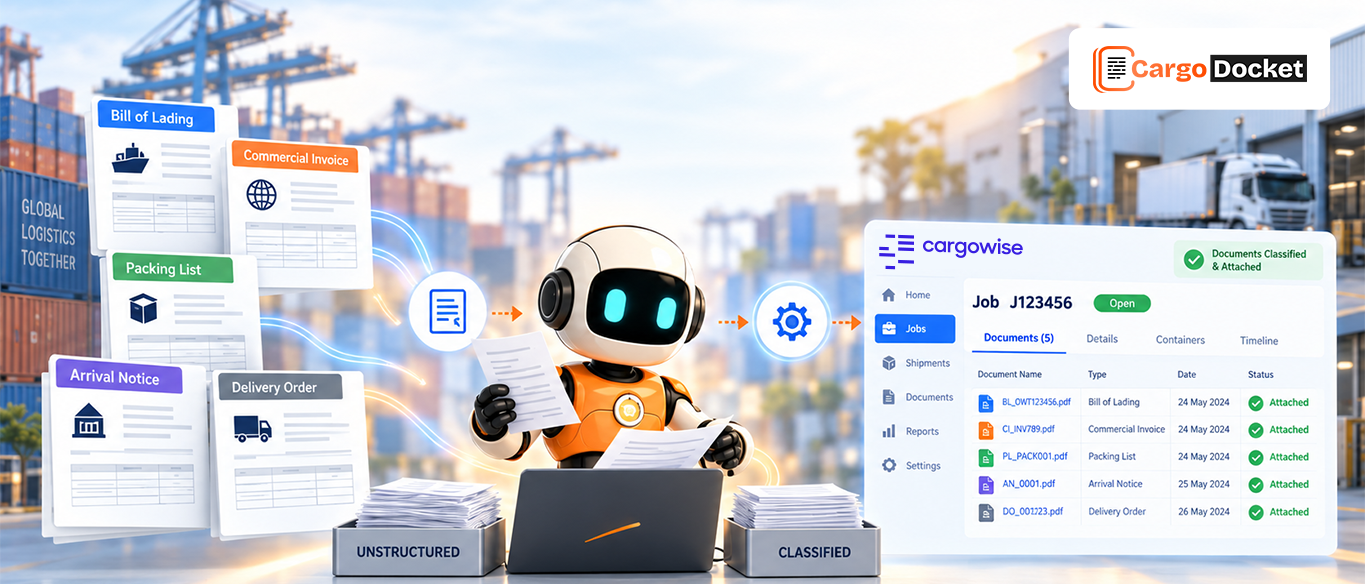
When an attachment arrives, AI can identify what type of document it is and recognize the information inside it. A Bill of Lading can be identified separately from a Commercial Invoice or Packing List, while relevant shipment references can be captured from the document itself.
The system can then use that information to determine how the document should be handled.
For example, a document containing a container number, shipment reference, or booking number can provide useful clues for connecting it to an existing shipment. Instead of asking an employee to inspect every attachment manually, AI can help organize the information and prepare it for the next step.
The goal is simple: make the document understandable before it reaches the operational workflow.
🔗 How can AI Match Logistics Documents with the Right CargoWise Shipment?
Once AI identifies the document, the next question is where it belongs in CargoWise. Shipment references, booking numbers, container numbers, invoice numbers, and other identifiers can help connect an incoming document with the appropriate CargoWise shipment or job.
For example, when a Bill of Lading arrives by email, AI can identify its shipment-related information and use it to help determine the correct CargoWise record. The same approach can be applied to invoices, packing lists, delivery documents, and other shipment paperwork.
This connection is important because organizing a document isn’t just about storing the file. It is about making sure the document is associated with the right operational context.
CargoWise provides digital document management capabilities through eDocs, including document storage, access, sharing, and automated document workflows.
📂 How can AI Organize Logistics Documents in CargoWise?
After the document is identified and matched, AI can help organize it within the appropriate CargoWise shipment or job.
Instead of an employee opening CargoWise, finding the shipment, locating the correct document area, and manually attaching the file, an automated workflow can help move the document into the appropriate record.
The process can follow a straightforward path:
Email received → Document identified → Information extracted → Shipment matched → Document validated → Document organized in CargoWise
This also creates a more consistent document structure across shipments. Teams don’t have to rely as heavily on individual employees remembering how and where different documents should be stored, and when someone needs to find a document later, it can be much easier to locate it through the shipment record rather than searching through an inbox.
📑 Which Logistics Documents can AI Organize in CargoWise?
The workflow can support many documents used throughout the shipment lifecycle, including:
- Bills of Lading
- Commercial Invoices
- Packing Lists
- Air Waybills
- Delivery Orders
- Proof of Delivery
- Certificates of Origin
- Shipping Instructions
The goal isn’t simply to process more files. It’s to make sure the right documents reach the right shipment with less manual effort.
🛡️ How can AI Validate Documents Before they Reach CargoWise?
Not every document should move through automation without a check. If a shipment reference is missing, information conflicts with an existing record, or the document cannot be confidently classified, AI can flag the issue for human review.
That creates a simple balance:
Routine documents → Automated processing
Exceptions → Human review
Teams can therefore spend less time checking every document and more time dealing with the cases that actually need their attention.
📈 What Changes When Logistics Documents are Organized Automatically in CargoWise?
When document handling becomes more connected, teams can spend less time searching through inboxes and manually organizing attachments.
They can access shipment documents more quickly, reduce repetitive data entry, and maintain a more consistent document process as shipment volumes grow. The bigger benefit is simple: information gets to the right place sooner, so people can act on it sooner.
📌 Conclusion
AI Document Management can help turn incoming logistics documents into organized, usable information by connecting the email inbox with CargoWise.
Want to simplify how your team handles logistics documents? Explore AI Document Automation to reduce manual document work and create a smoother flow into CargoWise.